Exception Handling in Microcontrollers
What causes it and how does the system get back to work?
By: Maanya Golash
Outline
- What is an exception?
- Why does the exception handling matter?
- How the ARM Cortex M4 does it
- Common faults
- Debugging a Hardfault (with an example)
- Building a good fault handler
Microcontrollers usually operate for specific purpose tasks (eg. in washing machines, traffic lights, drones etc). Like any normal PC, this small computer doesn’t have an operating system to manage its tasks. Most, if not all run a single program, in a limited memory space and lower processing power. These microcontrollers are usually interfaced with peripherals to control external hardware.
Now, if an exception arises, it must be managed in an organised method. To start with, the exception must be identified.
What is an exception?
An exception is any event that changes the normal, sequential execution of a program.
Under normal conditions, a processor executes instructions one after another. When an exception occurs, the processor:
- Stops normal execution
- Saves the current processor state
- Transfers control to a predefined handler
This process helps it go back to the original execution once the exception is dealt with.
That brings us to the categories of exceptions:
1. Interrupts (i.e. Expected events)
Since microcontrollers interact with external hardware via peripherals, the CPU shouldn’t be stalled till the peripheral returns the required data, so once done, the hardware triggers an interrupt and till then another task is managed.
Interrupts are used to manage real time tasks efficiently.
Some common examples:
- Timer overflow
- ADC conversion complete
- UART data receiving
2. Faults (i.e. Error situations)
Triggered when an abnormality occurs in normal execution.
During normal execution, the CPU expects every instruction to be valid like accessing legal memory, using properly aligned data, and following defined operations. When this assumption is violated, the processor detects the abnormal condition and raises a fault exception, transferring control to a predefined handler instead of continuing execution.
Some common examples would be:
- Invalid memory access
- Divide by 0
- Stack overflow
Why does exception handling matter?
To run a program successfully, the goal is to be able to resolve a problem and not cause a system failure, all while ensuring device safety.
So what could actually go wrong?
- Memory corruption
- Infinite loops
- Unsafe hardware states
- Lock up
- Uncontrolled resets
Then how does the ARM Cortex-M4 do it?
ARM Cortex-M4 is used in several industrial microcontroller boards like the STM32F4 series.
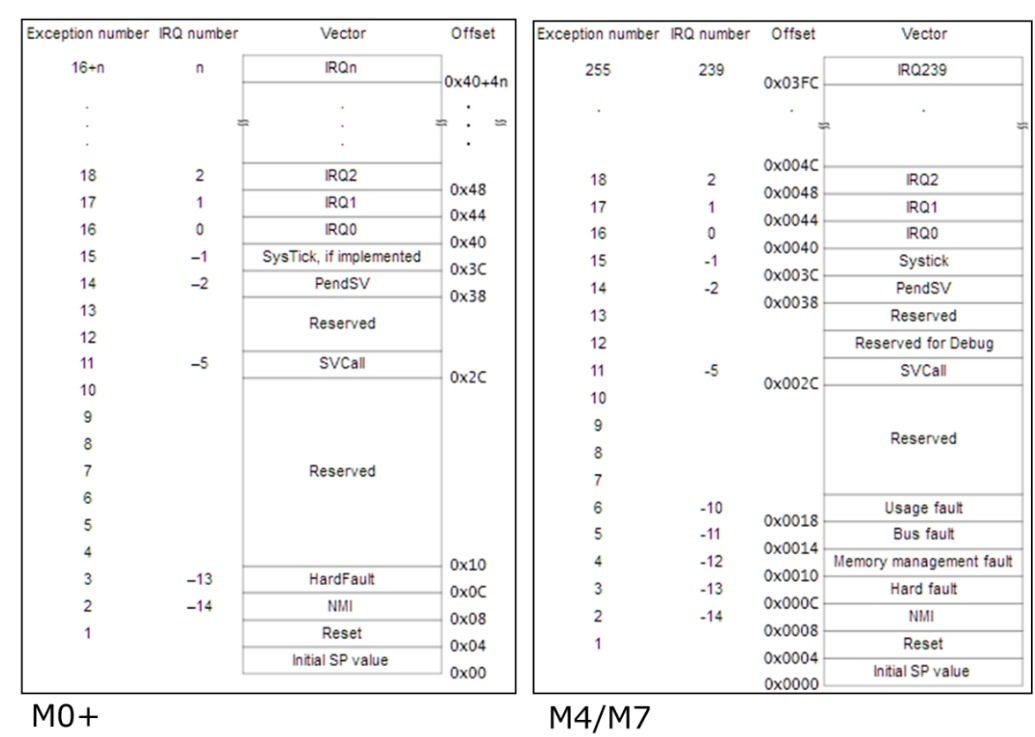
ARM Cortex M4 has an interrupt vector table that points to the address of the respective interrupt handlers. It has predefined exceptions (offset 0x0000 - 0x003C) and programmable interrupts (offset 0x0040 upwards).
What the interrupt vector table does is, it acts like a look up table of addresses to the location of the handler functions/routines for specific interrupts.
You can look at it to be somewhat like a lift with buttons, labeled with a number and each number takes you to a specific floor.
Note that the indicated addresses are not the actual memory addresses but the offsets from the base address of the vector table in the memory which is the Vector Table Offset Register (VTOR) + Exception number.
The bottom two entries are special, they act as:
[0] Initial Stack Pointer
[1] Reset Handler
Used when the CPU powers on. It extracts whatever is written as these two addresses and places them into the Stack Pointer and PC (which is now pointing to the reset handler).
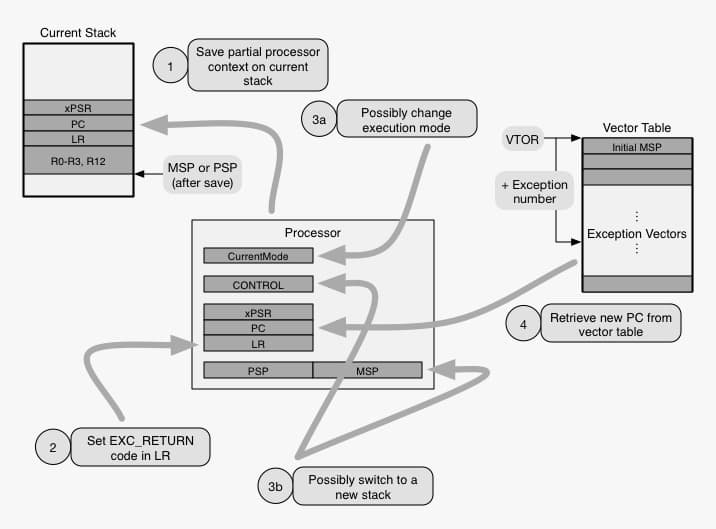
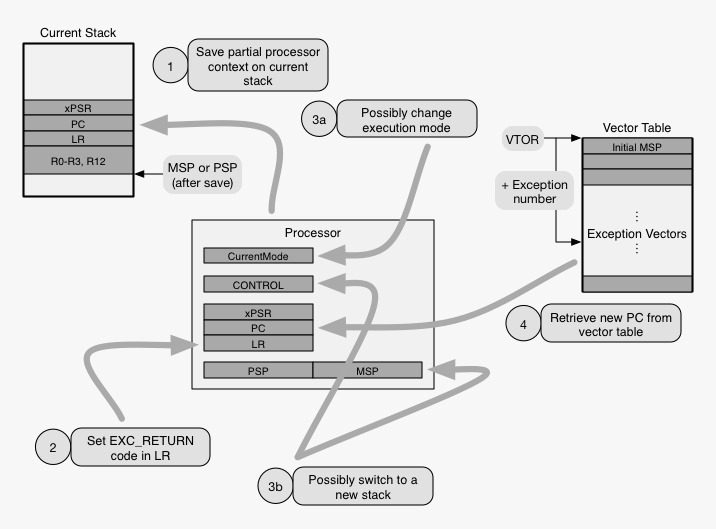
If we look at the diagram we can see that when a fault occurs, the Cortex-M4 performs the following steps:
1. NVIC Detection
The Nested Vector Interrupt Controller (NVIC) monitors interrupts and faults, checks if the interrupt is enabled and compares priority based on a preset order.
If priority is higher than the current scope of execution, the exception is accepted.
Here’s a little more about NVIC:
It is a hardware component in the microcontroller that does four jobs:
- Allows us to enable or disable interrupts.
- Priority check (lower number = higher priority).
- Allows nested interrupts, which happens if a low priority ISR is running -> a high priority interrupt arrives -> then te CPU switches to the higher priority interrupt.
- Maps the interrupt number to the vector table.
Example:
Timers have a higher priority than GPIO.
2. Mode Switch
CPU switches from:
Thread mode (normal code)
        ↓
Handler mode (exception code)
3. Stack Saving
Before jumping to the handler, the CPU automatically pushes the following registers onto the active stack (MSP or PSP) to preserve current state:
- R0–R3 (low general purpose registers)
- R12 (high general purpose register)
- LR (Link Register - R14)
- PC (Program Counter - R15)
- xPSR (Program Status Register)
The xPSR contains:
Condition flags (N, Z, C, V)
+ Execution state
+ Exception number
4. Vector Table Jump
The CPU reads the handler address from the vector table and loads it into the PC.
Now the ISR (Interrupt Service Routine) or fault handler executes.
5. Handler Execution
The handler is a defined function that does some action with respect to the interrupt/fault that is to be serviced.
Example:
void TIM_IRQHandler(void)
{
    // do something related to timer
}
Usually contains a while() loop.
Some peripheral registers like Timers and UART have flags which ar elike status bits that indicate whether a certain event has occurred.
These flags have to be cleared by the handler because the interrupt will keep being triggered if the flag is set high, leading to an infinite interrupt loop.
In case of a fault, it is important for the CPU to trace where the fault occurred. To do that on occurrence of a fault, the CPU captures the current PC, certain registers and fault status registers by either printing or storing them onto the stack. The latter being the more common approach.
6. Return from Exception
Instruction run at the end of the handler function:
BX LR
The processor:
- Pops saved registers from stack.
- Restores PC and xPSR.
- Switches back to thread mode.
Then the execution resumes where it stopped. In case of a fault, fault specific status registers are also updated.
What are some common faults?
HardFault
Triggered when another fault cannot be handled or memory corruption occurs.
BusFault
- Invalid memory or peripheral access.
- Accessing a peripheral before enabling its clock.
- DMA errors.
UsageFault
- Divide by zero (if enabled).
- Undefined instruction.
- Unaligned memory access.
MemManage Fault
Triggered when Memory Protection Unit (MPU) detects illegal access.
Debugging a HardFault
A HardFault is a mandatory hardware exception that triggers when the CPU attempts an illegal operation it cannot recover from, such as accessing invalid memory or executing corrupted instructions.
The moment a HardFault occurs, the hardware does something called stacking which is automatically saving a snapshot of its current state and registers onto the stack, so we can tell which line of code caused the failure.
The memory now contains the Stack Frame, which has:
-
Program Counter (PC) : Tells address of the instruction that caused the crash.
-
Link Register (LR) : The address of the function that called the current one (the "caller").
-
R0-R3 : The data the CPU was actively processing.
The ARM Cortex has Fault Status Registers which are like warning signs. Below are some types:
- MMFAR (Memory Management Fault address register): If say, we try to read a bad or corrupted memory location, it will actually store that very address. For example, if it shows
0x00000000, we know now that we have a Null Pointer error. - CFSR (Configurable Fault Status register) : Which could enable handling for situations like divided by zero, running code from a place only meant for data.
- BFAR (Bus Fault Address register): It pinpoints to the address the CPU was attempting to access just before the fault occurred.
- HFSR (Hard Fault Status register): Tells us if the system crashed because of a smaller error like a memory violation
Let's take an example that leads to a fault
int *ptr = (int*)0x00000000;
int value = *ptr; // invalid memory access
Usually while(1) is commonly used in the handler, but that just halts the program. To find out about the CPU state, the following steps should help:
#1 Use an inline ARM assembly wrapper to get the active stack pointer and saved registers:
void HardFault_Handler(void)
{   __asm volatile
   (
       "TST lr, #4     \n"    //checks bit 2 of LR (0=MSP, 1=PSP)
       "ITE EQ         \n"    //if equal, execute next, else alternative
       "MRSEQ r0, MSP  \n"    //Equal -> main stack pointer in r0
       "MRSNE r0, PSP  \n"    //Not Equal -> process stack pointer in r0
       "B hardfault_c  \n"    //Branch to c function
   );
}
#2 Extract Fault Information
void hardfault_c(uint32_t *stack)
{
   uint32_t fault_pc = stack[6];  //6th position of stack contains active PC
   uint32_t fault_lr = stack[5];  //5th position of stack contains value in link register
   uint32_t fault_psr = stack[7]; //7th position of stack contains PSR value

 //Reading special fault registers to retrieve the cause of the fault
   uint32_t cfsr = SCB->CFSR;
   uint32_t hfsr = SCB->HFSR;
   uint32_t bfar = SCB->BFAR;

   while(1);  // acts as breakpoint and halt execution temporarily
}
#3 Analyze
- Inspect
fault_pc - Open the disassembly view
- Check which instruction caused the crash
- Decode the CFSR bits
Examples:
- If CFSR shows
DIVBYZERO→ it means division error. - If BFAR contains an address → it means invalid memory access.
Building a Good Fault Handler
Now usually debug handlers are minimal and have:
void HardFault_Handler(void)
{
    while(1);
}
It should work for simple debugging, by simply halting the CPU. But to actually extract the source of the fault, a handler must be more detailed.
A good fault handler, however:
- Captures program counter.
- Logs important registers.
- Stores crash information in non-volatile memory.
- Places hardware in a safe state.
- Resets without problems.
Here’s an example of a production-like fault handler:
typedef struct
{
    uint32_t pc;
    uint32_t lr;
    uint32_t cfsr;
    uint32_t hfsr;
} fault_log_t;

volatile fault_log_t fault_log;

void hardfault_c(uint32_t *stack)
{
    fault_log.pc = stack[6];
    fault_log.lr = stack[5];
    fault_log.cfsr = SCB->CFSR;
    fault_log.hfsr = SCB->HFSR;

    // Ensure hardware is safe
    disable_actuators();

    // Reset system
    NVIC_SystemReset();
}
Exception handling is an important skill to make sure a program running in any microcontroller of choice runs smoothly and, in case of an error, raises the possibility of tracing the source of the error/interrupt and dealing with it before proceeding with the rest of the program.
Hope this blog gives you an insight into dealing with exceptions and a small introduction to ARM’s way of doing it.
So the next time you write an exception handler, you know what to do!
Here are some more resources to learn from :
- https://youtu.be/yX4Gn40TeDY?si=C2eObTCr5fOm5INZ
- https://interrupt.memfault.com/blog/arm-cortex-m-exceptions-and-nvic
- https://interrupt.memfault.com/blog/cortex-m-hardfault-debug
- https://share.google/NOg3rX20n2nInQYyD
Thank you for reading!